How to Make a TikTok Slideshow That Sells (Step by Step, 2026)
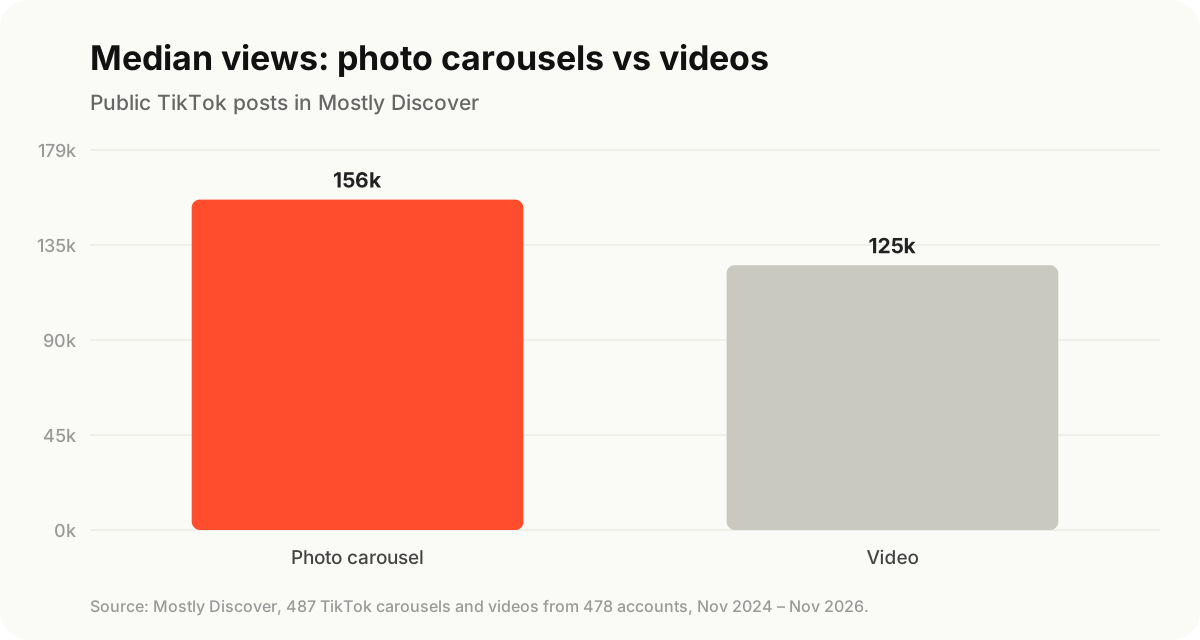
TikTok photo carousels got a higher median view count than videos in our library of 487 posts. Here's how to make one in the app, the slide structure that sells a product, and a real example built for the Stanley Quencher.
 Moss5 min read
To make a TikTok slideshow, tap +, choose Photo, select up to 35 images, add a sound and text, then write your caption and post. For a product brand, the slides matter more than the steps: open with a hook slide, give one useful point per slide, show the product in use, and end with a question that invites comments. In our data, photo carousels got a median of 156,000 views against 125,000 for videos.
Key takeaways
- TikTok slideshows (Photo Mode) hold up to 35 images. Most winners use 4–8.
- In our library of 487 public TikTok posts, carousels beat videos: median 156k views vs 125k. In a second library of 1,937 posts, carousels beat their accounts' usual views by more than videos did (5.2× vs 4.6×).
- Use the hook → value → product → proof → question structure.
- Make slides 9:16 (1080×1920) with the text in the top third, so the caption and buttons don't cover it.
Why slideshows work for small brands
You don't need to film, edit or appear on camera. A slideshow is just good images and a few lines of text, which means you can make one from product photos you already have. People also swipe through at their own pace and often go back, which adds watch time and saves.
We checked this against Mostly Discover, which tracks public TikTok posts from brands and creators:
| Format | Posts | Median views | Broke out (2.5× account median) |
|---|---|---|---|
| Photo carousel | 222 | 156k | 25% |
| Video | 265 | 125k | 23% |
The gap isn't huge, and the library leans toward posts that did well. But for a brand with no video team, it's a strong reason to make carousels a regular part of the mix.
How to make a slideshow on TikTok (Photo Mode)
- Open TikTok and tap + at the bottom of the screen.
- Tap Upload (or the gallery icon), then switch to the Photos tab.
- Select your images in order. You can pick up to 35. The order you tap is the order they appear.
- Make sure it's set to Photo mode, not video. If TikTok turns your photos into a video with transitions, tap the switch at the bottom to change it back to photo mode so people swipe.
- Add a sound and text. Pick a sound from the Sounds menu and add text to each slide with the Aa tool. If your slides already have text designed in, skip this.
- Tap Next, write your caption, and post (or save as a draft and schedule it).
You can also upload a slideshow from desktop at tiktok.com/upload, which is easier if you design slides on a computer.
The 5-slide structure that sells a product
Here's a carousel we built for a real product, the Stanley Quencher tumbler, using the structure most product carousels in our library follow.
Slide 1: the hook. One bold line that makes people swipe. Warnings and "you're doing it wrong" lines work well.

Slides 2–4: one point per slide. Each slide gives one tip, with the product in use in the image. Keep it to one headline and one short supporting line.

Final slide: the question. Ask something easy to answer in a comment. Comments push the post to more people, and the replies tell you what your buyers care about.

We generated these three slides with AI (GPT Image 2.6) from a text prompt, and the text on each slide came out exactly as written. For your own product, use your real product photos so the details are right; our AI image generator test shows which models handle product labels best.
TikTok slideshow ideas for product brands
| Idea | Slide 1 hook | Works for |
|---|---|---|
| Mistakes | "3 ways you're using your [product] wrong" | Anything with a "right way" to use it |
| Routine | "My 5-step night routine for oily skin" | Skincare, haircare, wellness |
| Before / after | "Day 1 vs day 30" | Skincare, fitness, home, cleaning |
| Gift guide | "Gifts for the friend who has everything (under $40)" | Most products in Q4 |
| Ranking | "Ranking every flavor so you don't have to" | Food, drink, multi-variant products |
| Notes app | A screenshot-style list of "things I'd buy again" | Gadgets, home, fashion |
| FAQ | "Things people ask me about [product]" | Products with common objections |
For more opening lines, see our TikTok hooks that sell.
Slideshow design tips
- Size: 9:16, 1080×1920 pixels. Other sizes get cropped or letterboxed.
- Text in the top third. The caption, username and buttons cover the bottom and right side.
- One idea per slide, 12 words or fewer. If it needs a paragraph, it needs another slide.
- High contrast text: white with a soft shadow or a solid background block. Thin fonts disappear on busy photos.
- Same style across slides. Same font, same text position, same colour treatment. It reads as one post, not a pile of images.
- Product in at least half the slides, in use, not just on a white background.
- 4–8 slides. Long enough to earn the swipe, short enough to finish.
Cross-check: what a second library shows
In the larger library of creators and brands Discover follows (1,937 TikTok posts from 521 accounts), only 52 posts were carousels. Their raw median views were lower than videos (40k vs 174k), because the accounts posting carousels were smaller. But measured against each account's usual views, carousels had the bigger lift: 5.2× vs 4.6× for videos. For a small brand, that relative lift is the number that matters.
Need images for your slides? Our 15 product photography ideas each come with a prompt you can reuse.
FAQ
How many photos can you put in a TikTok slideshow?
Up to 35 in Photo Mode. Most product carousels that perform well use 4–8.
What size should TikTok slideshow images be?
9:16 vertical, 1080×1920 pixels. Keep important text in the top two-thirds so the caption and buttons don't cover it.
Why does TikTok turn my photos into a video?
Some upload paths default to a video slideshow with transitions. Switch to photo mode before posting so viewers swipe through the images themselves.
Can you add music to a TikTok photo slideshow?
Yes. Tap Sounds before posting and pick any track. The sound plays while people swipe through.
Do TikTok slideshows get fewer views than videos?
Not in our data. Photo carousels had a higher median view count (156k vs 125k) across 487 public posts, and in a second library of 1,937 posts they beat their accounts' usual views by more than videos did.
Can I schedule a TikTok slideshow?
Yes. TikTok's desktop uploader lets you schedule posts, and scheduling tools can post carousels for you at set times. See our data on the best time to post on TikTok.
Designing 5–8 matching slides by hand takes an afternoon. Mostly designs on-brand TikTok and Instagram carousels from your website and product photos, and you edit any slide before it goes out.