GPT Image 2.6 for Product Photos: Sunburst vs Flare vs 2.5 (Tested)
Three briefs, three real products, three GPT Image models, one attempt each. Every label came out right. The differences were in colour, layout and how far each model drifted from the brief.
 Moss6 min read
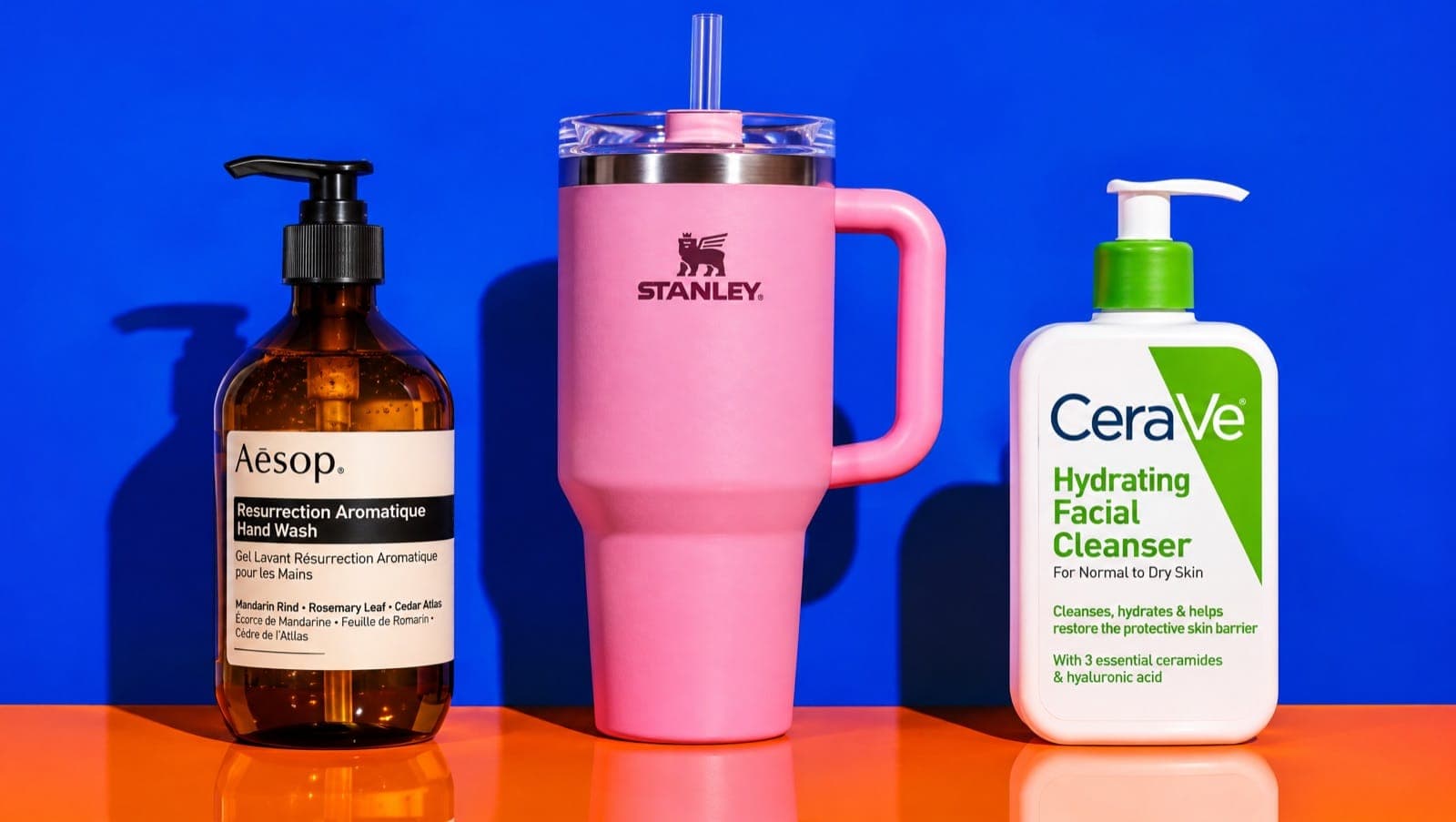
For product photos, use GPT Image 2.6 Sunburst when the packaging has to match and 2.6 Flare for drafts and lifestyle scenes. We ran three briefs on real products (a label-heavy bottle, a text-heavy ad and a UGC-style shot) through Sunburst, Flare and GPT Image 2.5 Sunburst. All three spelled every label and headline correctly. Flare was the one that went off brief: it changed CeraVe's blue to green.
Key takeaways
- Spelling wasn't the problem. All three models spelled the Aesop label, every callout on a Stanley ad and the CeraVe label correctly on the first try.
- 2.6 Sunburst stayed closest to the brief: right colours, callout lines pointing to the right parts, nothing extra.
- 2.6 Flare adds detail you didn't ask for. It wrote a second, French-language block on the Aesop label, and its CeraVe bottle had a green pump and green lettering where the prompt said blue.
- 2.5 Sunburst is still good, but its small text is smaller and it doesn't offer 4:5, so it rendered our feed shot at 3:4.
- Same price in Mostly: all three cost 8 credits per 1K image (as of November 2026).
What is GPT Image 2.6?
GPT Image 2.6 is OpenAI's image model released on November 4, 2026, in ChatGPT and the API. It comes in two versions: Flare, built for speed and iteration, and Sunburst, built for detail and edits that keep the subject intact (OpenAI's announcement). Reported API pricing is the same as 2.5.
Both versions take up to 16 reference images and render up to 4K. In Mostly they sit next to 2.5 Sunburst and 2.5 Flare, Nano Banana, Seedream, Kling Image 4 and MiniMax H3, so you can run the same brief across them.
How we tested
Three briefs, each built around a real, well-known product so you can judge accuracy yourself:
- Label test: Aesop Resurrection Aromatique Hand Wash on a wet travertine sink, label text required to be legible. 4:5.
- Text-heavy ad: a Stanley Quencher 40 oz in Rose Quartz with a headline and four feature callouts pointing to specific parts. 1:1.
- UGC-style shot: a hand holding a CeraVe Hydrating Facial Cleanser in a messy bathroom, phone-camera look. 9:16.
Rules: one attempt per model, no reference images, prompt enhancement off, identical prompts, 1K resolution. Brands appear because they're recognisable test subjects. None of these are ads for them.
Test 1: can it get a dense label right?
All three did. The brief asked for "Aēsop" and "Resurrection Aromatique Hand Wash", and every model rendered both correctly, macron included.
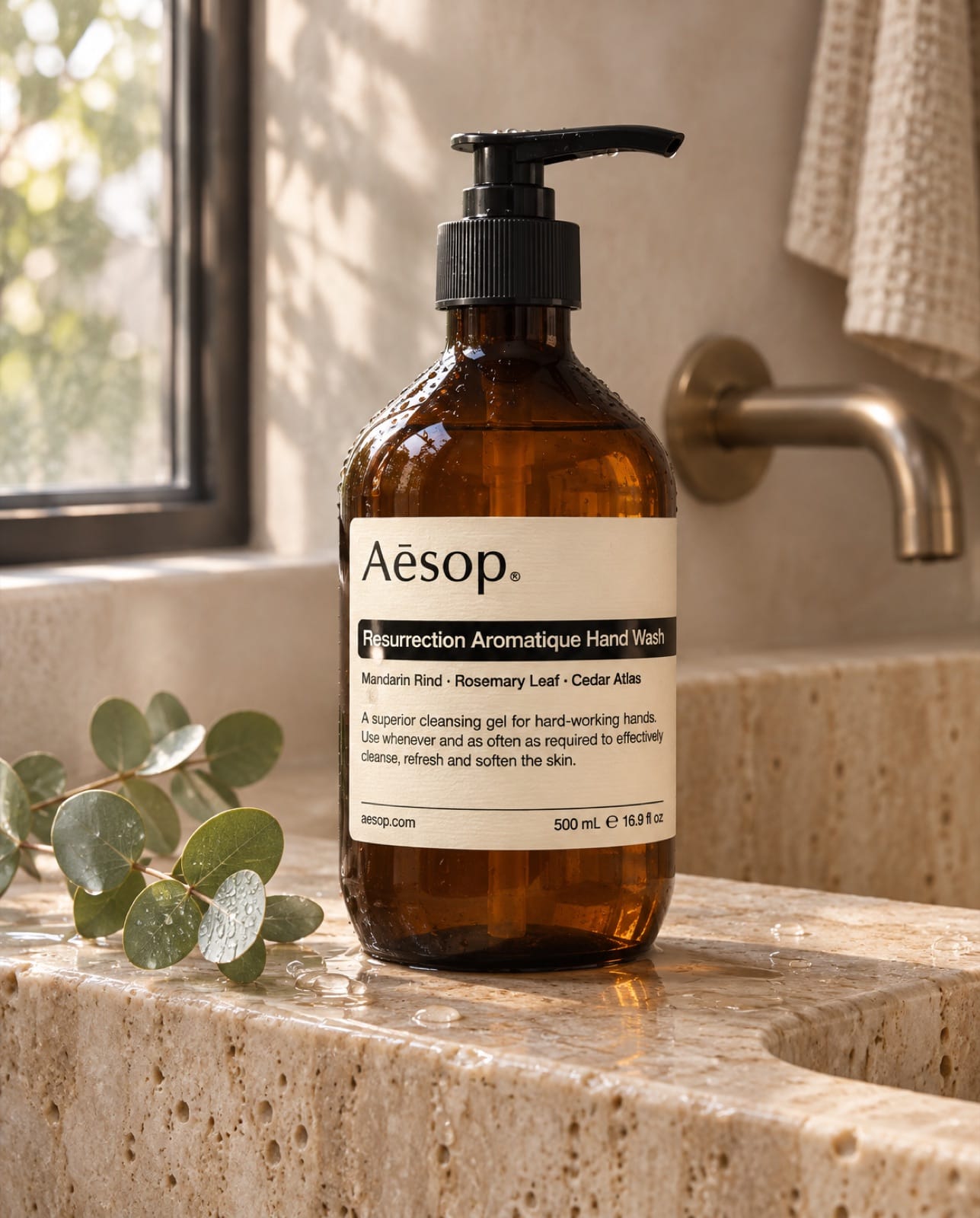
GPT Image 2.6 Sunburst: clean label, ingredient line and a short description, wet sink, eucalyptus. Exactly the brief.
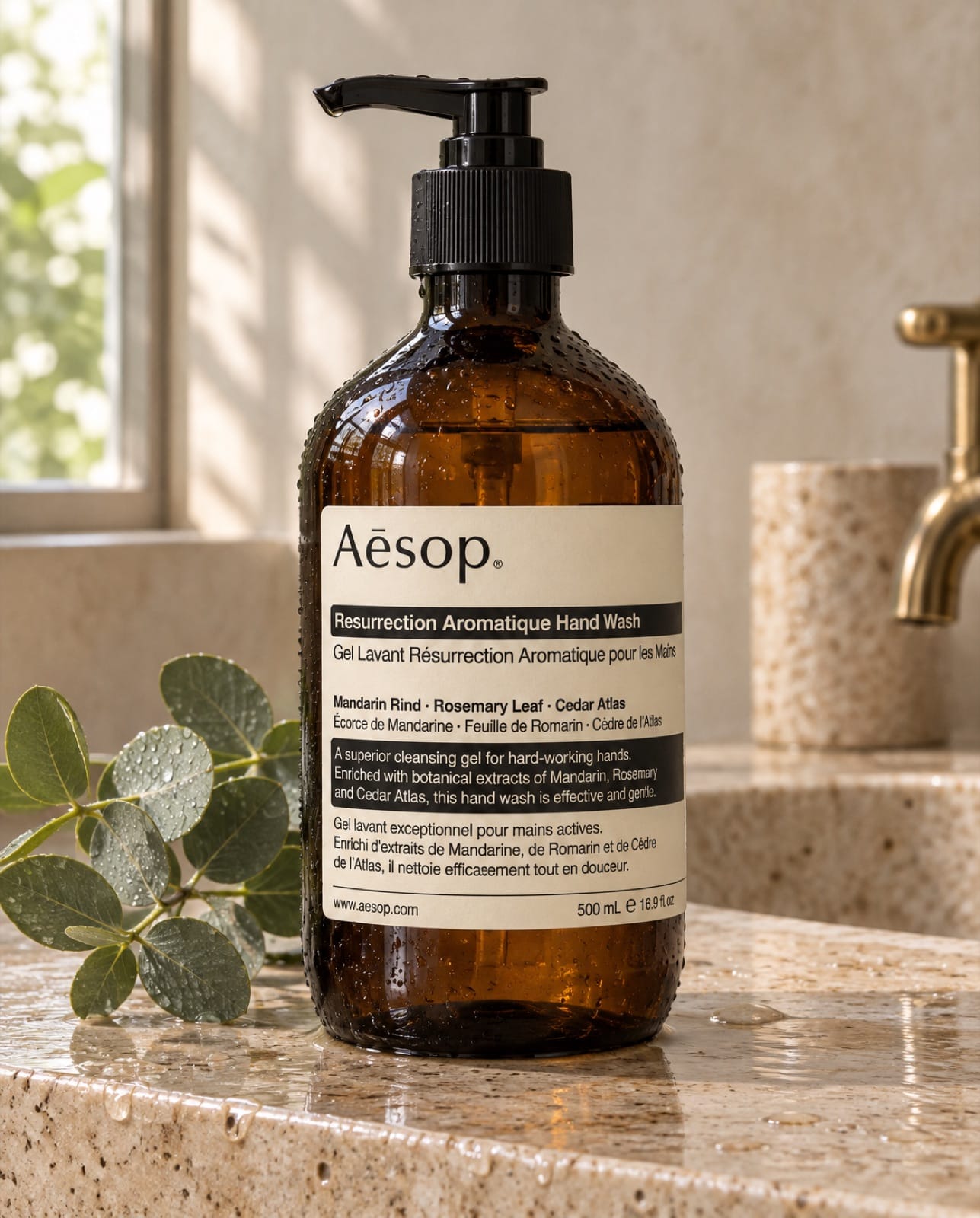
2.6 Flare: also correct, but it filled the label with a second paragraph in French. The real bottle does carry French text, so it isn't wrong, but you didn't ask for it.
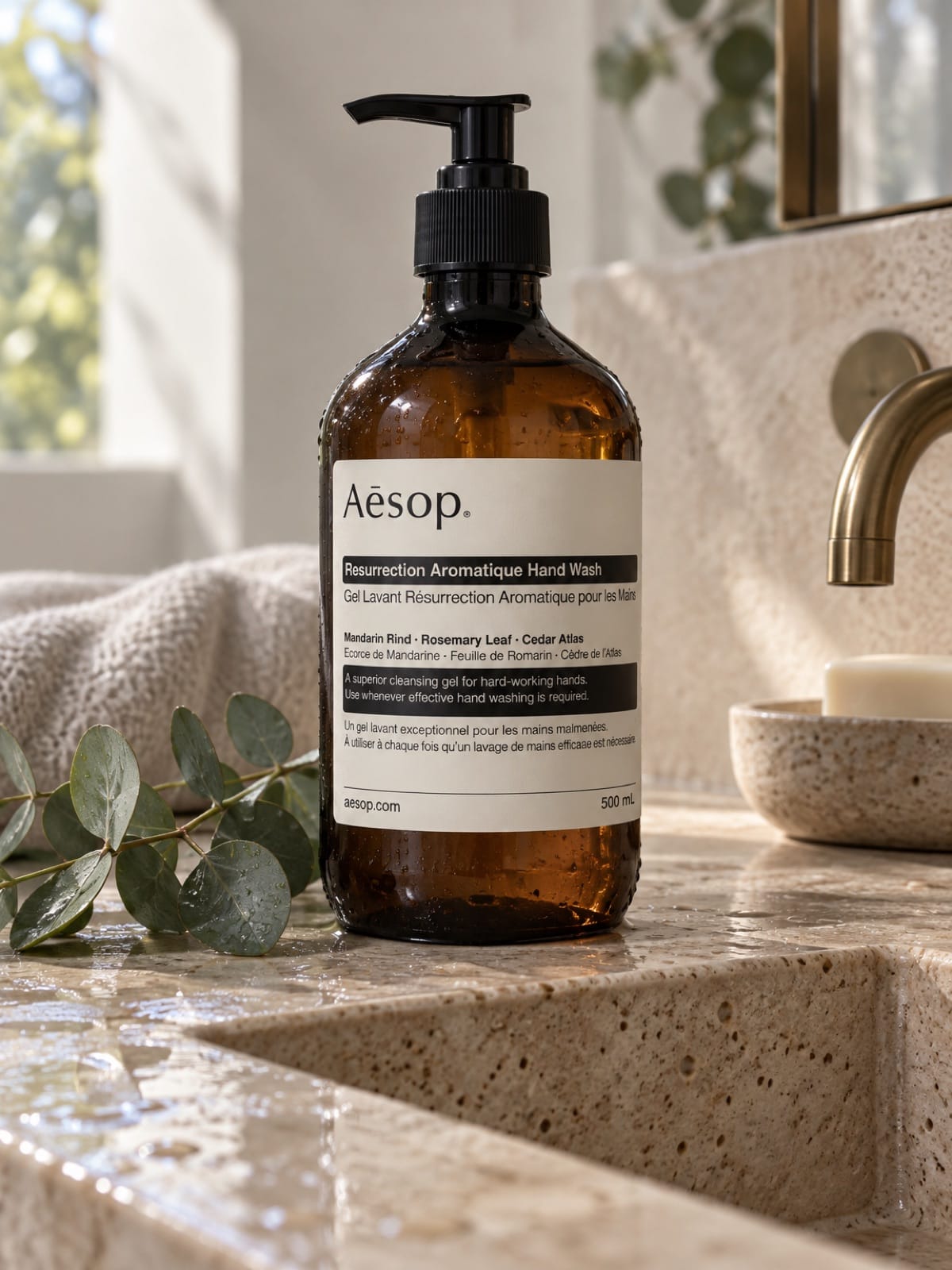
2.5 Sunburst: correct brand and product name; the fine print is tiny. It doesn't support 4:5, so Mostly fell back to 3:4.
Verdict: a tie on accuracy. Sunburst 2.6 had the most readable label at feed size.
Test 2: a feature-callout ad with five pieces of text
This is the format that broke image models a year ago: a headline plus four labels, each with a line pointing to a specific part of the product. Feature callouts are one of the static ad formats that keep running on Meta, so it's a useful test.
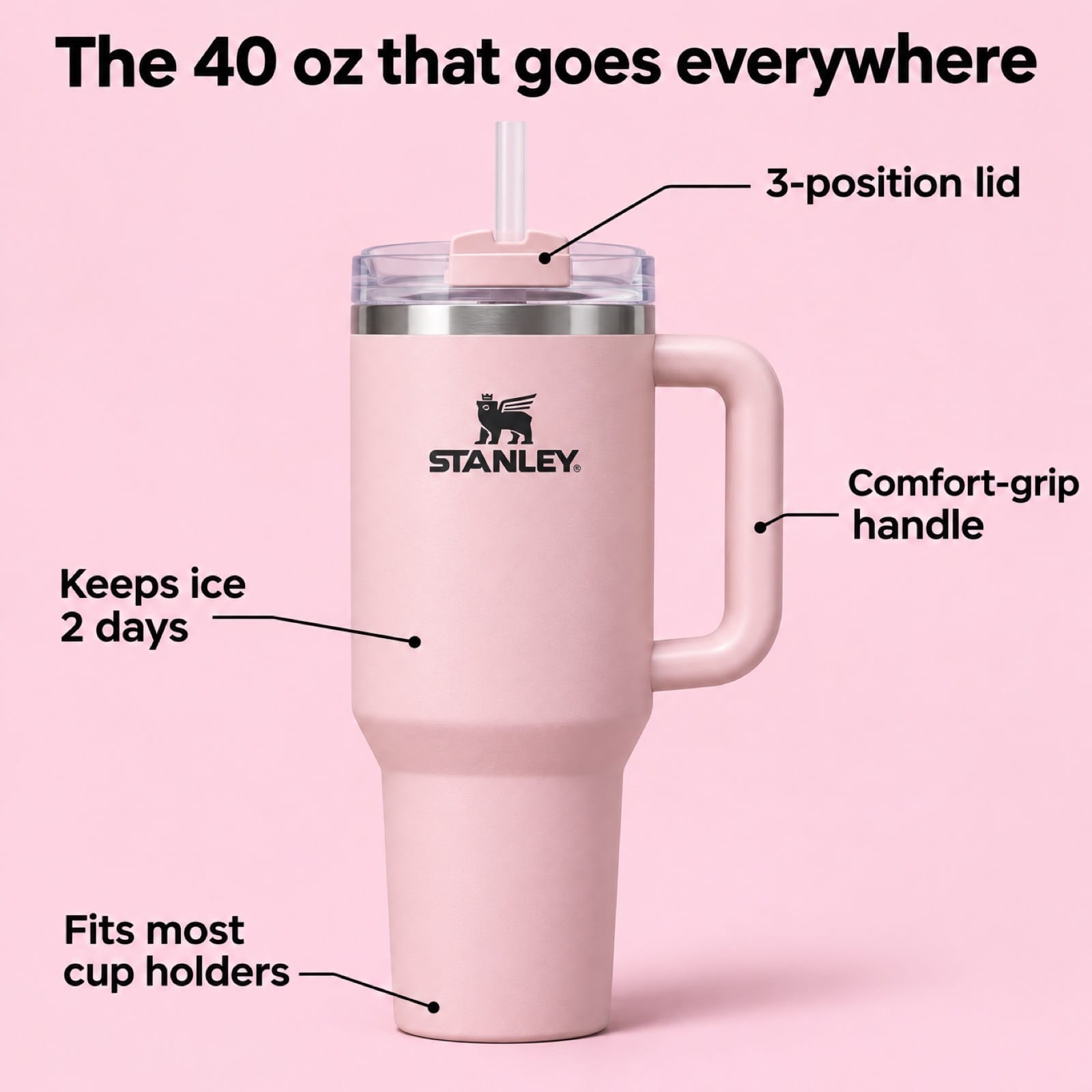
2.6 Sunburst: every word right, every callout line lands on the right part (lid, handle, body, base). Biggest, boldest type.
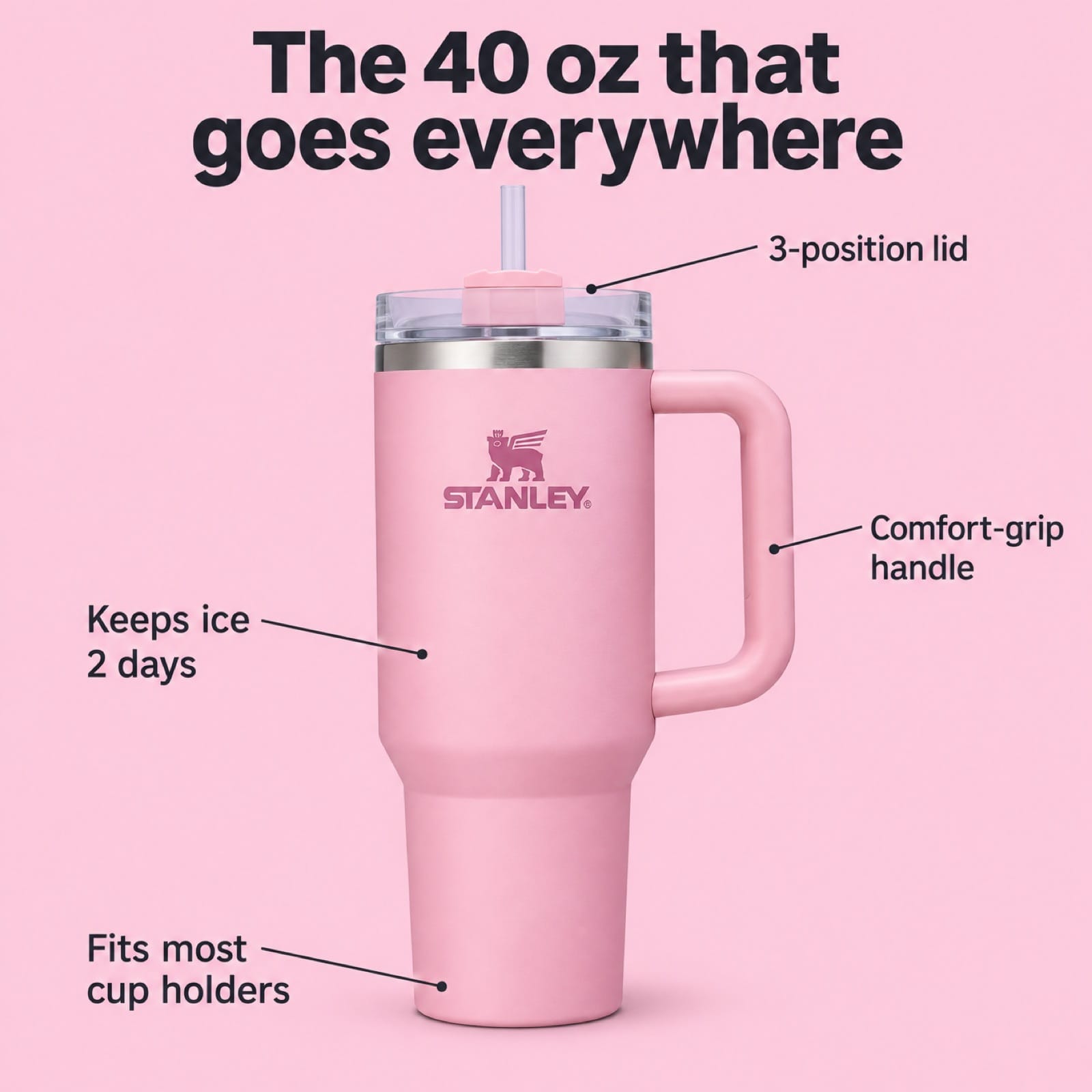
2.6 Flare: all text correct. It tinted the Stanley logo pink to match the tumbler, while the other two printed it dark. Compare logo colour against your real product before using a shot like this.
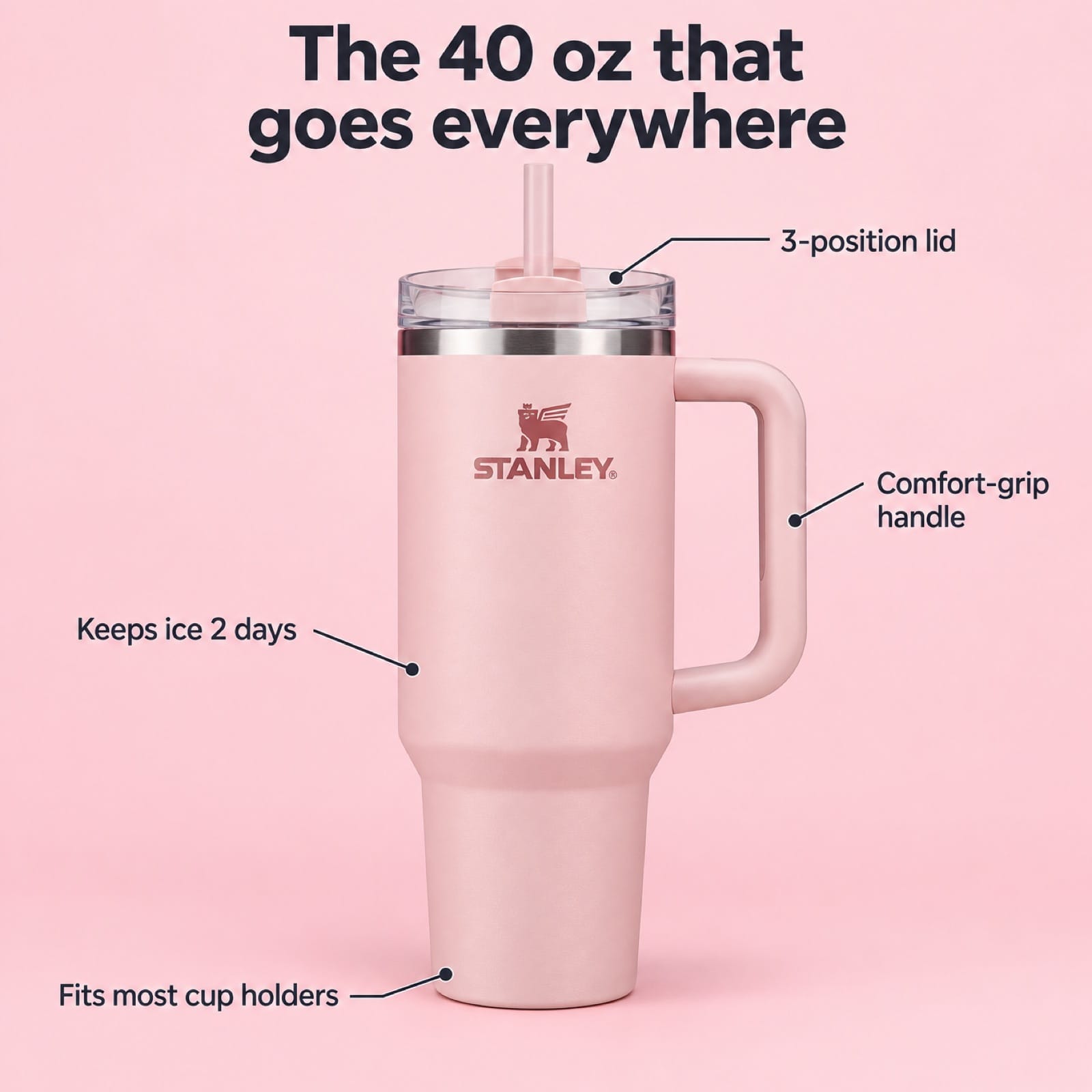
2.5 Sunburst: all text correct, lines accurate, but the callouts are small. On a phone they'd be hard to read.
Verdict: 2.6 Sunburst. It's the only one you could post without moving anything.
Test 3: does it keep brand colours in a casual UGC shot?
Here the difference was obvious. The prompt described a white bottle with a blue logo and blue label band.
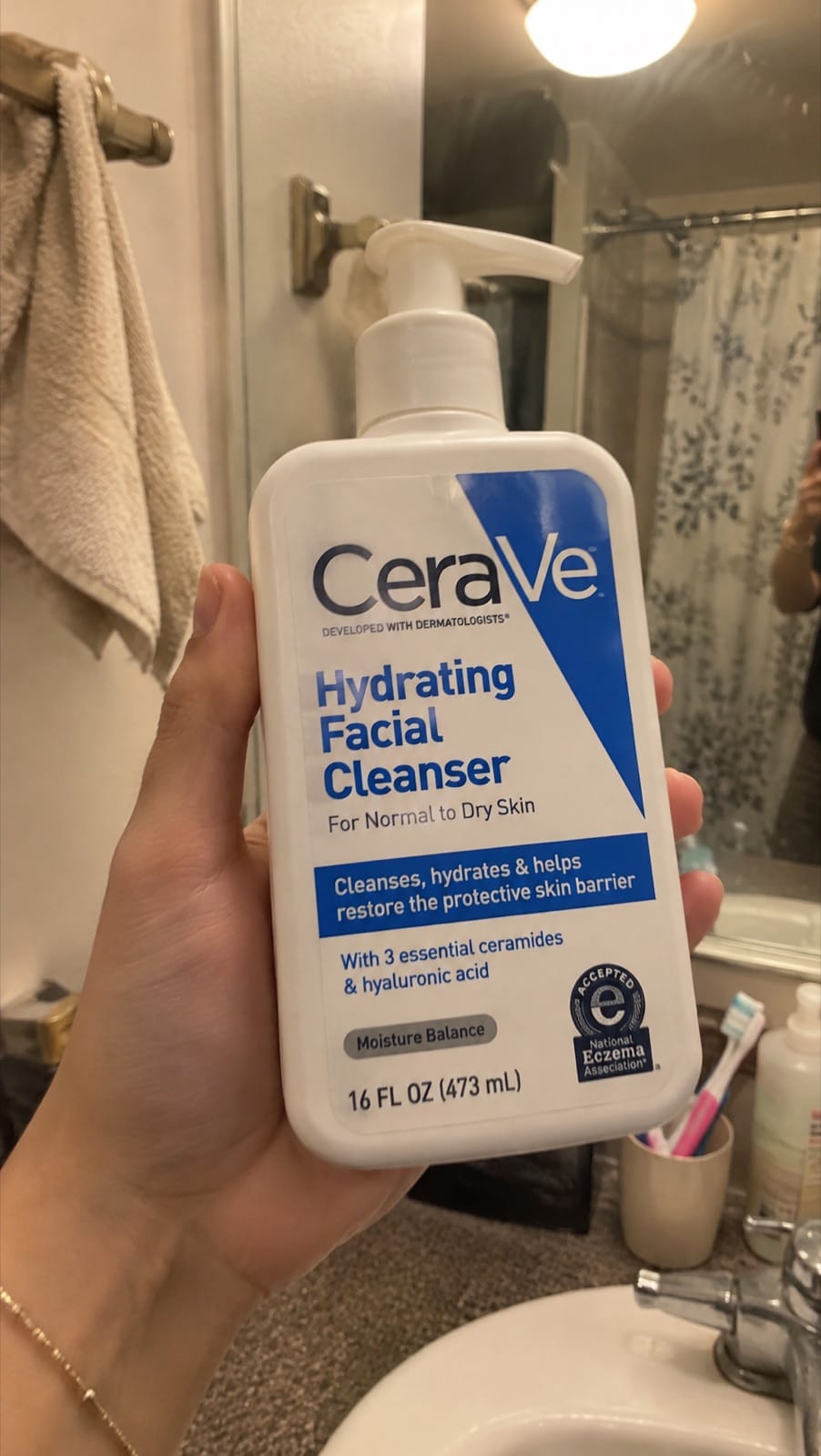
2.6 Sunburst: blue branding, white pump, a believable bathroom with the photographer reflected in the mirror. It reads as a real phone photo.
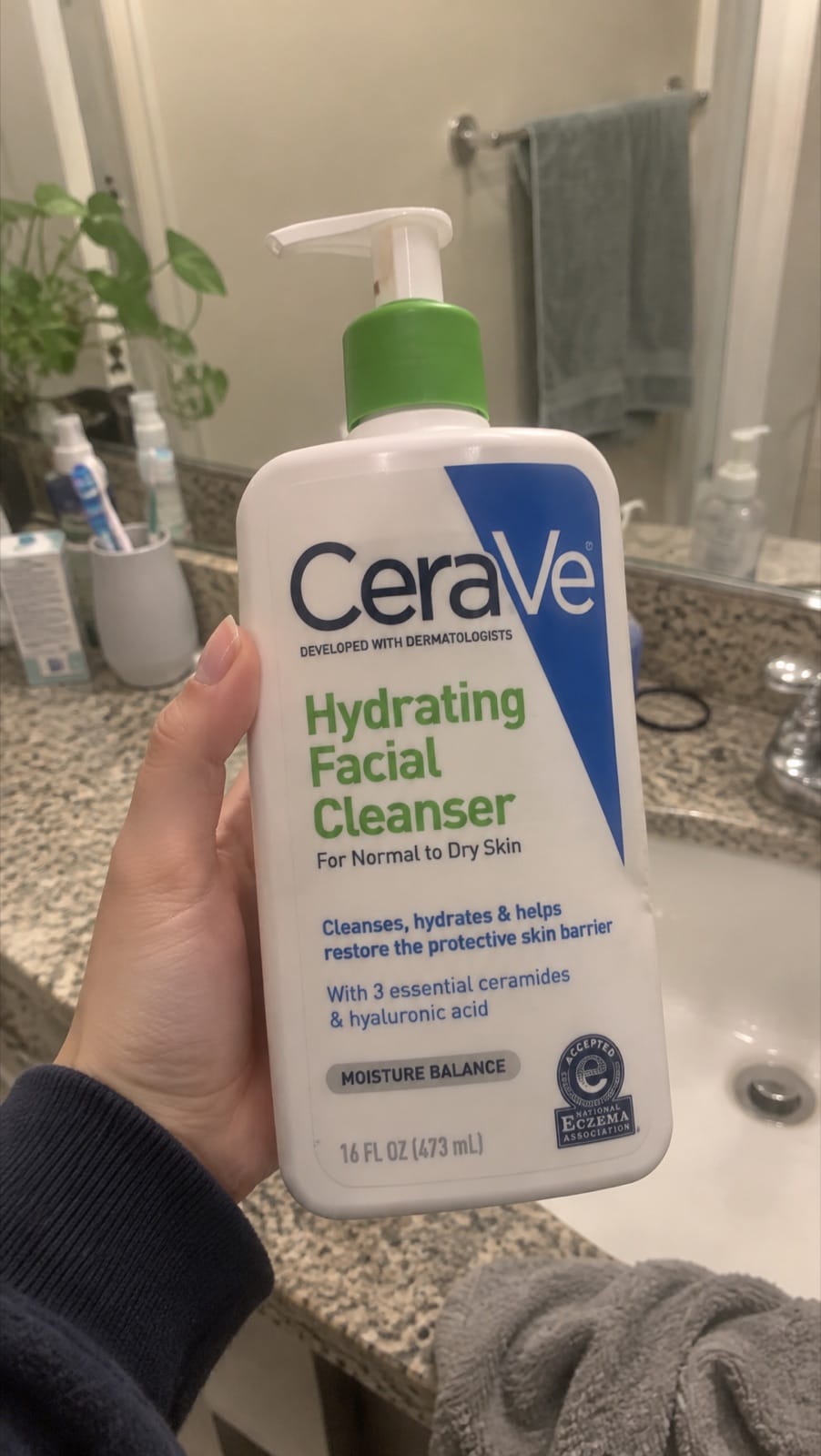
2.6 Flare: the text is right but the pump cap and product name are green. That's off brief, and a customer would notice.
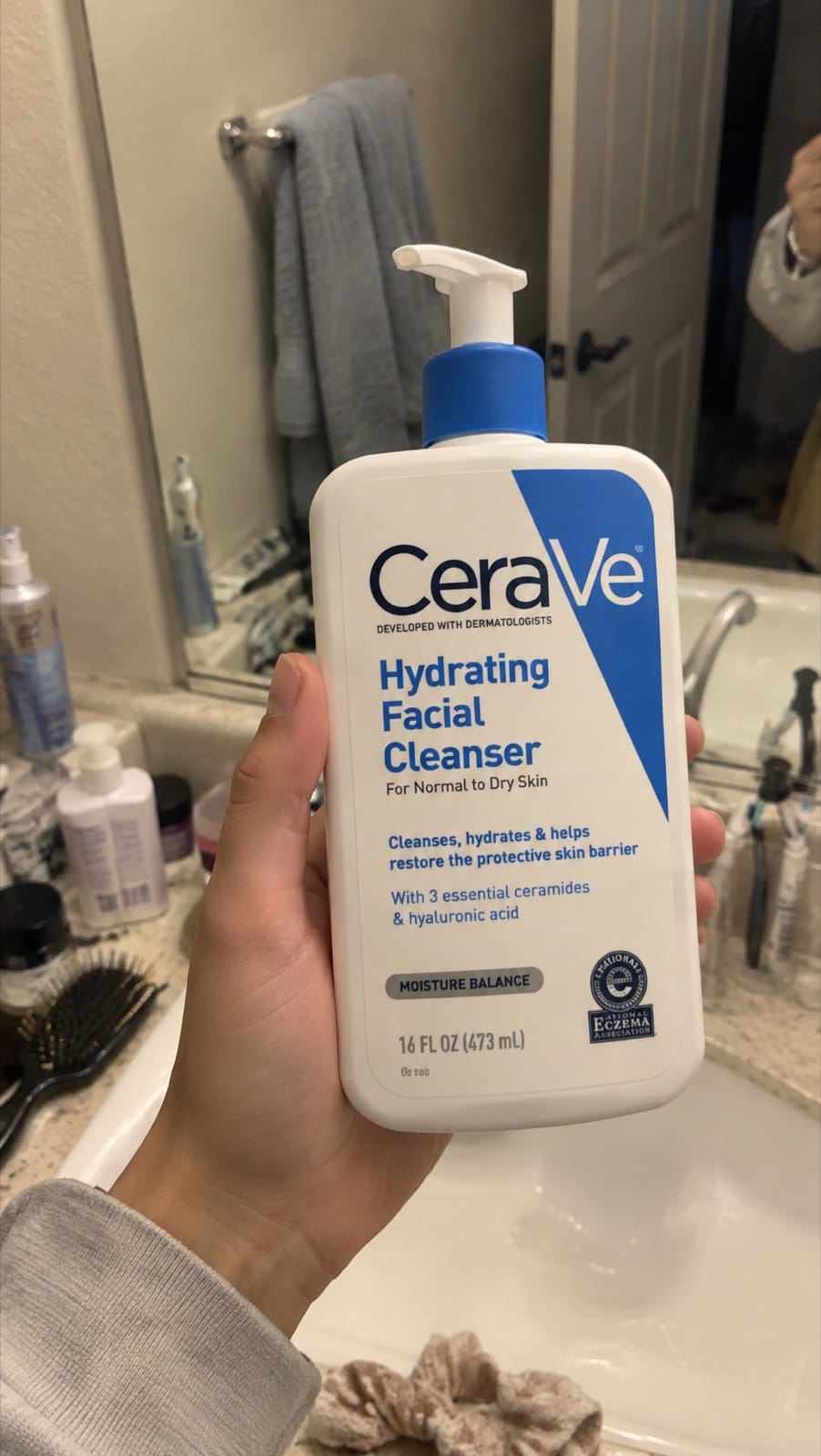
2.5 Sunburst: blue branding, correct text, a blue pump collar. Convincing UGC look.
One honest caveat: we later used 2.6 Sunburst for this post's cover, with three products in one frame, and it also gave the CeraVe bottle a green pump. Both 2.6 models seem to associate CeraVe with green at times. Without a reference photo, check brand colours on every image.
Scorecard
| 2.6 Sunburst | 2.6 Flare | 2.5 Sunburst | |
|---|---|---|---|
| Label text (Aesop) | Correct, most readable | Correct, extra French block | Correct, small |
| Ad with 5 text elements | Correct, best layout | Correct, logo recoloured | Correct, small callouts |
| Brand colours (CeraVe) | Right | Wrong (green) | Right |
| Aspect ratios | 4:5, 1:1, 9:16 all native | All native | No 4:5 (fell back to 3:4) |
| Credits in Mostly (1K) | 8 | 8 | 8 |
Which GPT Image model should you use?
| Job | Use |
|---|---|
| Product-page and ad images where the packaging must match | 2.6 Sunburst, with your product photos as references |
| Text-heavy static ads (callouts, comparison charts, offers) | 2.6 Sunburst |
| Fast drafts, mood boards, lots of lifestyle variations | 2.6 Flare |
| You already have 2.5 prompts that work | Keep them, but move to 2.6 Sunburst for 4:5 feed images |
If you're comparing beyond OpenAI, our six-model product photo test puts GPT Image 2.6 against Kling Image 4, Seedream 5.5, Nano Banana and MiniMax H3. Kling Image 4 matched it on label accuracy there.
How to prompt GPT Image 2.6 for product photos
- Put the exact label text in quotes ("Resurrection Aromatique Hand Wash"). All three models followed quoted text.
- Name the brand colours and parts ("white pump, blue label band"). It didn't fully stop Flare drifting, but it's your best defence without references.
- Add 2–4 photos of your real product as references for anything you'll publish. Your product isn't famous, so without references the model has to guess.
- For callout ads, say where each line points ("(lid)", "(base)"). Sunburst followed those placements exactly.
- Check at full size before posting: colours, logo tone, fine print.
For more scene ideas to try these on, see 15 product photography ideas with prompts.
FAQ
What is the difference between GPT Image 2.6 Sunburst and Flare?
Flare is built for speed and quick iteration; Sunburst is built for detail and for edits that keep the subject unchanged. In our product tests Sunburst stayed closer to the brief, while Flare added unrequested details and changed one brand's colours.
Is GPT Image 2.6 better than 2.5?
For product work, a little. Both rendered text correctly in our tests. 2.6 Sunburst produced larger, more readable text, supports 4:5 natively, and placed ad callouts more cleanly.
Can GPT Image 2.6 write text on images?
Yes. All three GPT Image models we tested spelled a headline, four callouts and two product labels correctly on the first attempt.
Does GPT Image 2.6 know real products?
It knows famous ones well: the Aesop, Stanley and CeraVe shapes were close to the real thing. It still gets colours wrong sometimes, so use reference photos of your own product.
How much does GPT Image 2.6 cost?
In Mostly, 8 credits per image at 1K, 12 at 2K and 16 at 4K, the same as 2.5 (as of November 2026).
Want to run your own product through Sunburst and Flare side by side? Try it in Mostly. Your product photos are used as references automatically.